Saturday, 28 September 2013
Thunderbirds are go!
I was discussing with my daughter (who is currently on a Schools Direct Teacher Training programme) the age old problem of collecting the class back together after group activities - or even to put an end to noisy chatter.
One of her pet hates is the use of the 5 4 3 2 1 countdown. She loves how one of her teachers uses quirky video clips and music.
This reminded me of the classic Thunderbirds countdown and I wondered about using this at apposite moments in the Scale Up class.....
It also seems appropriate as I nervously countdown to my first class on Monday :)

Monday, 23 September 2013
When is a student mentor not a student mentor....?
.... when they do not yet exist!
I am really disappointed that the process of approving the job descriptions for the student mentors is taking so long. Effectively this means that they will not be joining the group on Day 1 and I think we will miss out on gathering some important data about students' initial digital literacy needs. It may be possible for the tutors involved to do some of the observing/reporting and we can at least blog about it, but don't hold your breath - I think the initial weeks will be busy as we orientate ourselves too.
Another huge spanner in the works is that we have recruited well over 108 students on the first year of course and so will have to split the group after all. This is likely to mean one group of about 90 and another of around 30. I don't exactly know how timetabling will sort this. What I do know is that there will be no tutors available for the overspill session (except for me most probably) so overnight this has doubled my workload on the module. This will though give me an opportunity to test out the room with a smaller group and compare the two learning environments. (see - I always try and look on the bright side...)
A real positive so far is that, having met the first year students today in our official course induction, I can report that the vast majority are already fairly savvy with NOW, their timetables and email.
The pre course survey we conducted also reveals a good level of confidence in using the internet. So the nuts and bolts of digital literacies/skills that we used to have to focus on in the first couple of weeks are not now as necessary for quite so many students and I am hoping we can really hit the ground running.
More information on the critical digital literacies can be found here (these informed the design of the first year module).
Doug Belshaw's introduction to Digital Literacy is summarised in this Slideshare presentation
I am really disappointed that the process of approving the job descriptions for the student mentors is taking so long. Effectively this means that they will not be joining the group on Day 1 and I think we will miss out on gathering some important data about students' initial digital literacy needs. It may be possible for the tutors involved to do some of the observing/reporting and we can at least blog about it, but don't hold your breath - I think the initial weeks will be busy as we orientate ourselves too.
Another huge spanner in the works is that we have recruited well over 108 students on the first year of course and so will have to split the group after all. This is likely to mean one group of about 90 and another of around 30. I don't exactly know how timetabling will sort this. What I do know is that there will be no tutors available for the overspill session (except for me most probably) so overnight this has doubled my workload on the module. This will though give me an opportunity to test out the room with a smaller group and compare the two learning environments. (see - I always try and look on the bright side...)
A real positive so far is that, having met the first year students today in our official course induction, I can report that the vast majority are already fairly savvy with NOW, their timetables and email.
The pre course survey we conducted also reveals a good level of confidence in using the internet. So the nuts and bolts of digital literacies/skills that we used to have to focus on in the first couple of weeks are not now as necessary for quite so many students and I am hoping we can really hit the ground running.
More information on the critical digital literacies can be found here (these informed the design of the first year module).
Doug Belshaw's introduction to Digital Literacy is summarised in this Slideshare presentation
Wednesday, 18 September 2013
Feeling more reassured about the technology
After a really useful orientation session from one of the IS staff, I'm feeling happier about using the technology. I'm now able to control all screens, Apple TV is working, and know where the microphone is. For me, I think this will be the CRUCIAL bit of kit! That, or my trusty whistle from my days of running a Cub Scout pack... The scary part now is the scale of it all, hence the name. The thought of that room full of students is quite daunting, especially if they all ask for help. I'm really hoping they do learn from each other. My feelings swing from downright fear to optimistic excitement. It's refreshing to try out a new method of teaching and, if it's successful for the library sessions, it could be rolled out to colleagues as an alternative way for them to teach their large groups (which seem to grow each year).
Wednesday, 4 September 2013
Not as bad as I feared.... and some really good things to report.

Yesterday we had the first official demo of the new room set up and I for one really like it.
Forget for a moment about the shiny hardware quietly throbbing and glowing on the tables in front of us, the best bit of kit was the clip on wireless mic. In this large oblong space with 108 students (sorry, make that 108 chairs - we have actually enrolled 127 students since clearing...) it is going to be a challenge to make yourself heard above the hubbub.
Second best bit of kit is the switch on the teachin gconsole that allows you to show content on all three screens simultaneously - or not, as you like. I used this space last year for a one off session and we had to have Powerpoint monitors (like the ink monitors we used to have at school, not the monitor attached to your PC) at each end of the room, pressing the forward arrow when cued. The space is capable of being divided into three distinct rooms each with their own presenting console, screen and speakers, but for the big groups (like ours) it is now possible to have everything linked. This is really good news.
Thirdly - the tables. Now Sharon may be right and we should perhaps have had them a bit bigger, but they are pleasingly round, they do have holes in the middle where the power and network cables for the macs protrude and there is space for nine students in three gorups of three. I'd like to say we had tested the seating arrangements but actually less than half a dozen pilot leaders turned up for the session - we were outnumbered by the IT squad by about 2:1
Now for the niggles. The laptops are stored in charging cabinets which have big padlocks on the doors. The presenters yesterday cheated by having all the Macs ready on the desks, plugged in before we arrived. It was suggested to me that I could get to my session early and set up. Provided I am not teaching immediately before.... and provided no one is in the room before me using the space without laptops.
Then there is th fact that they are, well, Macs. But I have said all I want to say on that front. The IT guys were incredibly helpful, teaching me how to use the "gestures", when two fingers were required (don't tempt me...) and how to select Apple TV. The problem for my students is that there won't I suspect be 108 IT bods on hand to personally guide them through the process.
I asked for "Quick Start " help cards to be available and was told that there were some great You Tube videos showing how to use a Mac. So how were the students going to watch these if they couldn't use a Mac. In their own time? On their PCs? Do I need to go on?
So then I was advised to show the videos as part of my session - ie, teach the students how to use the kit as part of my lesson plan. OK, I am teaching digital literacy skills in one module so that's fair enough, perhaps. But my other module is concerned with team work and leadership - "How to Use a Mac" isn't one of the learning outcomes, so why am I spending my valuable contact time teaching students to use unfamiliar technology? The tech in that context should be invisible.
Anyway, I rather enjoyed playing with the Mac and with Apple TV and though the IT guys treated me with withering scorn when I said I had an Android tablet and preferred Google Drive to Sky Drive, I actually found them a jolly and helpful bunch who were genuinely enthusiastic about what they have created here.
I am sure there are going to be hiccups along the way, but I aim to keep calm and pretend its in the lesson plan.....
Tuesday, 27 August 2013
Mac fright
Earlier today I went to help a new academic set up his resource lists. Normally this would have nothing to do with the SCALE-UP pilot but, horrors of horrors, his monitor was connected to a Macbook. Instead of reassuring me that I've got nothing to worry about when in the new teaching room, it made me realise just how different they are to PCs. I definitely need some familiarisation time with one (my Mac-loving son will be earning his keep before he goes back to uni). On a positive note, many of the functions were the same, so providing the students and I don't need to right-click, refresh a page, or use a delete key we'll be fine...
Friday, 23 August 2013
Scaled down
Just to add to Jane's frustrations, we've also found out that the tables are about a foot shorter in circumference than the carefully researched recommendation by Robert Beichner. I've peeked at the tables when walking past the room and I very much hope the students like one another as they'll be sitting very close to each other to work in their groups. Good job collaboration is key in all this!
Sunday, 11 August 2013
BYOD
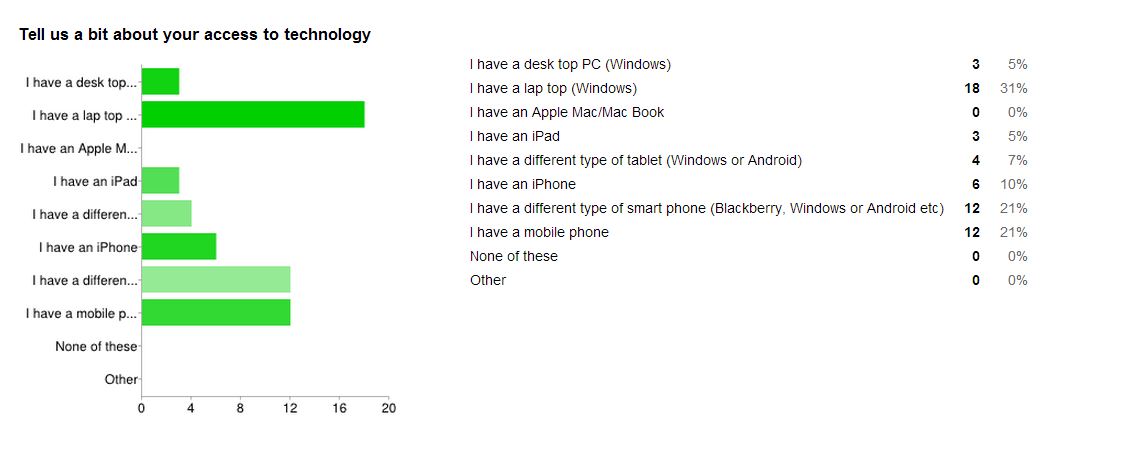
(click on image to view full size)
My team and I have recovered from the shock (and outrage at the lack of consultation or even listening) and are preparing for a teaching and learning environment somewhat different from the one we had envisaged.
We aim to have both a tech and a non tech activity available for our sessions and rely on the flipped classroom approach - access to websites taking place outside of the class with the workshops reserved for discussion and project work. That's fine - it just seems a shame given the technological aspirations of the Scale Up room with its fancy new lap tops and Apple TV.
The screenshot above (from our pre-course survey) above is interesting. Out of 20 students responding so far, none has an Apple pc or lap top and only 6 have iphones. Almost all do have laptops or wifi ennabled phone so the BYOD solution has potential.
I have stated in the module guide that BYOD will be the expected norm but that Macbooks are available. I expect some may want to have a go on them, but dishing out and collecting in 100+ laptops would eat into a good portion of a 50 minute session, never mind teaching OS X basics. So I am just hoping that the promised "flooding" of the room with wi fi, and the cooperation of students in bringing smart phones, tablets and even laptops, will mean that we can spend some sessions on digitally based activities.
I will be getting to work on these over the next few weeks.
_____________________________________________________________
In other - better, news..... our bid for funding for student mentors (through the Changing the Learning Landscape project) has been accepted :D
The aim is to have two students working with us each week to float between groups, observing where students have difficulties and helping out. They will then take these observations and use them to support library staff in creating universal resources to teach digital literacy skills. We also plan to work with the mentors on a conference paper and presentation next year. I'm really excited about this aspect of the project and can't wait to get started on recruiting!
Subscribe to:
Posts (Atom)